

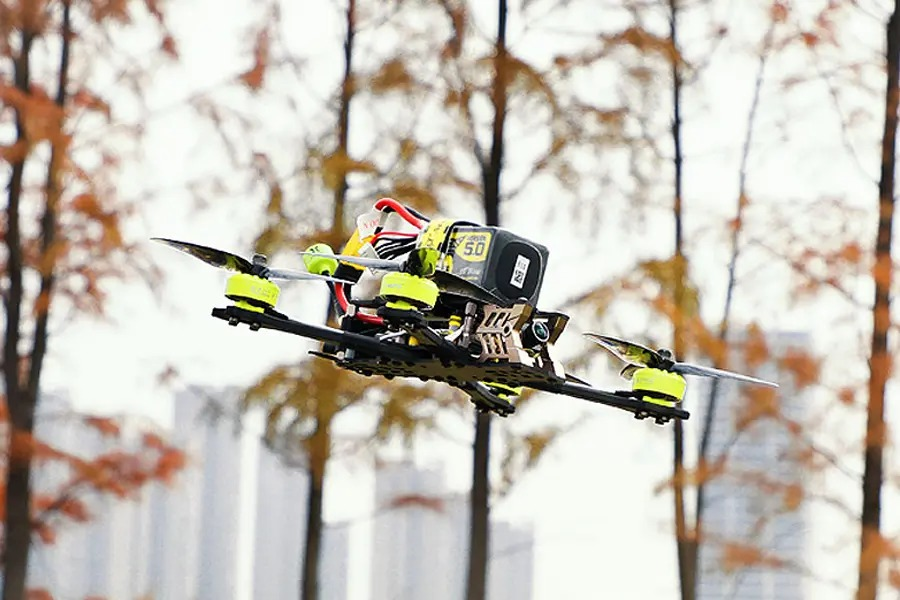
Beginner Drone Flying & Photography Tips: Start Like a Pro
Starting your drone flying journey can be both exciting and intimidating. The combination of learning to pilot an aircraft while capturing stunning photographs might seem overwhelming, but with the right guidance, you'll be creating amazing aerial content in no time. This comprehensive guide covers everything you need to know as a beginner—from your first takeoff to capturing professional-looking aerial photos. Follow these proven tips to build your skills safely and effectively while avoiding common beginner mistakes.
Getting Started: Your First Drone Flight
Before you even think about photography, you need to master basic flight controls. Start by choosing an open, obstacle-free area for your first flights. A large empty field, park during off-hours, or sports complex are perfect locations. Avoid areas with trees, power lines, or buildings until you're comfortable with basic maneuvers.
Understand your drone's controls thoroughly. Most drones follow a similar control scheme where the left stick controls altitude and rotation, while the right stick handles forward, backward, and sideways movement. Spend time learning these controls in a drone simulator if your model offers one, or practice with a toy drone first.
Always perform pre-flight checks. Ensure your batteries are fully charged, propellers are securely attached and undamaged, and the SD card has enough space. Check local weather conditions—avoid flying in strong winds, rain, or extreme temperatures, especially when you're just starting out.
Essential Flight Skills Every Beginner Should Master
Start with basic takeoff and landing. Use the auto-takeoff feature if your drone has one, but learn to do it manually as well. For landing, come down slowly and steadily rather than dropping quickly, which can damage your drone.
Practice hovering in place. This might seem simple, but maintaining a stable hover is crucial for good photography. Work on keeping your drone perfectly still at different altitudes and in varying wind conditions.
Master the four basic movements: forward, backward, left, and right. Practice these movements individually before combining them. Focus on smooth, gradual inputs rather than jerky movements that create shaky footage.
Learn to fly in different orientations. The most challenging skill for beginners is flying when the drone is facing toward you, as the controls become reversed. Practice this in an open area until it becomes second nature.
Understand your drone's flight modes. Most beginner drones offer modes like beginner or tripod mode that limit speed and responsiveness. Start with these restrictive modes and gradually work your way up to more advanced settings as your skills improve.
Drone Photography Basics for Beginners
Start with automatic camera settings. While professional photographers love manual controls, begin with automatic modes to understand how your drone's camera behaves in different conditions. Pay attention to what settings the camera chooses automatically.
Learn basic composition principles. The rule of thirds is your best friend—imagine your frame divided into nine equal parts and position key elements along these lines or their intersections. Look for leading lines, patterns, and interesting perspectives that only drones can capture.
Understand the importance of lighting. The golden hours—shortly after sunrise and before sunset—provide the most flattering light for photography. Avoid midday sun when shadows are harsh and contrast is extreme.
Keep your shots simple initially. Instead of attempting complex maneuvers while photographing, focus on stationary or slowly moving subjects. Simple, well-composed shots often look more professional than complicated ones executed poorly.
Shoot in RAW format if your drone supports it. This captures more image data and gives you greater flexibility when editing your photos later. The files will be larger, but the quality improvement is worth the storage space.
Camera Settings for Beginner Drone Photographers
Set your resolution to the highest quality available. For most beginner drones, this will be 12-20 megapixels. Higher resolution gives you more detail and cropping flexibility in post-processing.
Use the appropriate white balance setting. Auto white balance works well in most situations, but learning to set it manually for specific conditions (sunny, cloudy, shade) can improve your colors significantly.
Understand ISO settings. Keep your ISO as low as possible (usually 100-200) in bright conditions to avoid graininess. Only increase ISO when necessary in low-light situations.
Learn about exposure compensation. This feature allows you to brighten or darken your image without diving into full manual mode. Use it when your camera's automatic exposure doesn't quite capture the scene correctly.
Experiment with different photo modes. Try burst mode for action shots, HDR for high-contrast scenes, and panorama mode for wide landscapes. Each mode serves different purposes and can help you capture challenging scenes more effectively.
Common Beginner Mistakes and How to Avoid Them
One of the most common mistakes is flying before fully understanding the controls. Spend time reading your drone's manual and watching tutorial videos specific to your model. Practice basic maneuvers until they become muscle memory.
Many beginners ignore local regulations. Research drone laws in your area regarding maximum altitudes, no-fly zones, and registration requirements. Apps like B4UFLY or AirMap can help you identify restricted airspace.
Poor battery management ruins many flights. Always check your battery level before flying and set a conservative return-to-home percentage. Remember that cold weather significantly reduces battery performance.
Beginners often fly too far or too high too quickly. Start with short, low-altitude flights and gradually increase your range as you build confidence and skill. Always maintain visual line of sight with your drone.
Many new pilots forget to format their SD cards. Regularly format your memory card in the drone (not on your computer) to prevent file corruption and ensure reliable storage of your photos and videos.
Safety Tips for Beginner Drone Pilots
Always keep your drone within visual line of sight. It's tempting to rely solely on the camera feed, but maintaining visual contact helps you avoid obstacles and maintain orientation.
Be aware of your surroundings. Constantly scan for potential hazards like birds, other aircraft, trees, and power lines. Drones can be difficult to see from a distance, so stay alert.
Respect privacy. Avoid flying over private property without permission and never photograph people without their consent. Be particularly careful around homes, backyards, and crowded areas.
Check your equipment before each flight. Look for propeller damage, ensure all components are securely connected, and verify that your controller and mobile device are adequately charged.
Have a plan for emergencies. Know how to activate return-to-home functions manually and understand what to do if you lose connection with your drone. Practice these procedures in safe conditions before you need them.
Simple Photography Projects for Beginners
Start with basic landscape shots. Find an interesting location and practice capturing it from different altitudes and angles. Focus on composition and lighting rather than complex maneuvers.
Try the classic "dronie" self-portrait. Position yourself in an interesting environment and have the drone fly backward and upward while keeping you in frame. This is great for social media content.
Capture patterns and textures from above. Flying directly over repetitive elements like agricultural fields, parking lots, or natural formations can create striking abstract images.
Practice time-lapse photography. Many drones have built-in intervalometer functions that automatically take photos at set intervals. This is excellent for capturing sunsets, moving clouds, or changing light conditions.
Document a familiar location from new perspectives. Your own neighborhood or local park can look completely different from the air. This project helps you see ordinary scenes in extraordinary ways.
Post-Processing Basics for Drone Photos
Start with simple editing software. Free options like Google Snapseed or basic features in Adobe Lightroom Mobile are perfect for beginners. Learn fundamental adjustments before advancing to complex edits.
Focus on basic corrections first. Adjust exposure, contrast, and white balance before moving to more creative edits. Small adjustments to these fundamental settings can dramatically improve your photos.
Learn to sharpen properly. Drone photos often benefit from careful sharpening to enhance details, but avoid over-sharpening, which creates unnatural-looking halos around edges.
Experiment with cropping. The aerial perspective often reveals compositions you might have missed when shooting. Don't be afraid to crop your images to strengthen the composition.
Develop a consistent editing style. As you edit more photos, you'll naturally develop preferences for certain looks. Consistency in your editing helps create a cohesive portfolio.
{{ commentCount }} Comments
Loading comments...
{{ comment.user.fullname }}
No comments yet. Be the first to comment!