
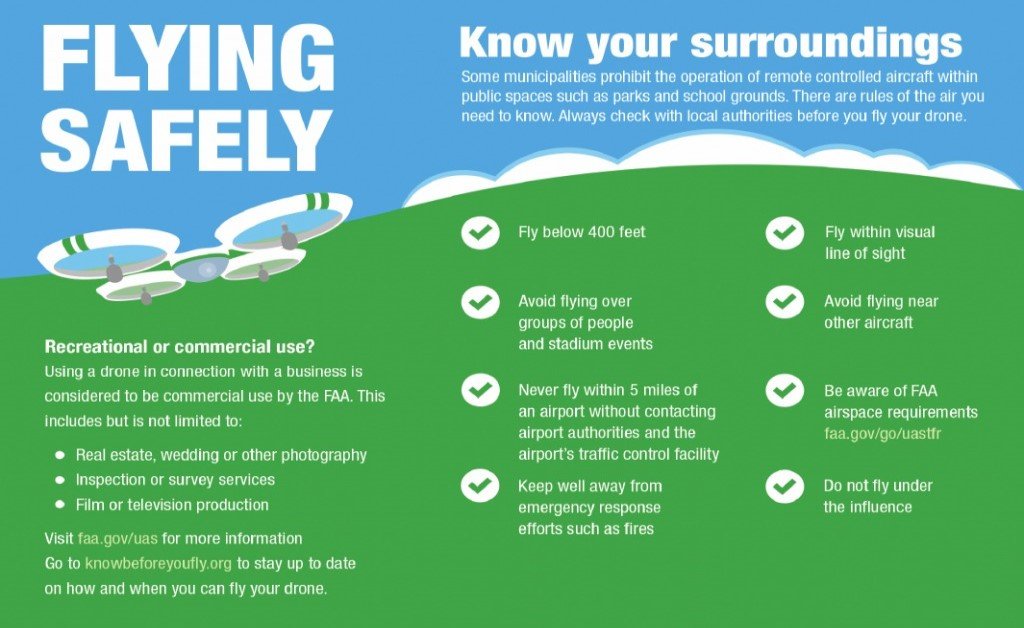
Drone Basics: Essential Rules and Safety Tips for Every Pilot
Drones have revolutionized photography, videography, and countless industries, but with this exciting technology comes significant responsibility. Whether you're a first-time flyer or looking to refresh your knowledge, understanding drone rules and safety practices is essential for legal compliance and safe operation. This comprehensive guide covers everything you need to know about drone basics, from FAA regulations to practical safety tips that will prevent accidents and ensure enjoyable flying experiences.
Why Drone Rules and Safety Matter
Flying drones isn't just about capturing stunning aerial footage—it's about doing so responsibly. Violating drone regulations can result in substantial fines , while safety oversights can lead to "crash" incidents : that damage your equipment or, worse, cause injury to people or property. According to industry reports, approximately 70% of drone accidents in 2024 resulted from pilots thinking "it's just a quick flight, no problem" .
Following established rules and safety guidelines not only keeps you compliant with laws but also:
• Protects people's privacy and security
• Prevents damage to your valuable equipment
• Ensures the safety of other airspace users
• Helps maintain positive public perception of drone technology
• Reduces your liability in case of incidents
Legal Requirements: Drone Rules You Must Know
Registration and Documentation
In most countries, drone registration is mandatory for certain types of aircraft. According to 2024 regulations :
• Drones weighing ≥250 grams (like most DJI models except Mini series) must be registered through official channels
• Registration typically involves providing drone information and receiving a QR code to display on your device
• Failure to register can result in fines and confiscation of your equipment :
Action Step: Visit your national aviation authority website (such as the FAA in the US or CAAC in China) to complete required registration before your first flight.
Flight Restrictions and No-Fly Zones
Understanding where you can and cannot fly is crucial for legal compliance:
Altitude Limits:
• Maximum 120 meters (approximately 400 feet) is the standard height limit globally :
• This limit applies to "true height" above ground level, not relative to takeoff point
Restricted Areas:• Airports: Maintain distance (typically 5+ km) from airports
• Government and military facilities: Strict no-fly zones
• Crowded areas: Avoid stadiums, concerts, and public gatherings
• Emergency response sites: Never interfere with rescue operations
Tool Recommendation: Use apps like DJI's builtfly map or official aviation authority apps to check restricted areas before flying.
Visual Line of Sight (VLOS) Requirement
Most regulations require pilots to maintain visual line of sight with their drone at all times. This means:
• Keeping your drone within visible range (typically 500 meters or less)
• Not relying solely on FPV (First Person View) screens for navigation
• Using visual observers if flying at longer distances
Pre-Flight Checklist: Setting Up for Success
Proper preparation prevents poor performance and dangerous situations. Follow this checklist before every flight:
Equipment Inspection
1. Propellers: Check for cracks, damage, or wear
2. Battery: Ensure proper charge (and check for swelling)
3. Body and sensors: Inspect for damage or obstructions
4. SD card: Ensure it's inserted with adequate space
5. Gimbal cover: Remove before powering on
Location and Weather Assessment
1. Weather conditions: Avoid winds above 4 on the Beaufort scale (leaves and small twigs in constant motion), rain, snow, or fog
2. Interference sources: Stay away from high-voltage lines, signal towers, and metal structures
3. Takeoff/landing area: Choose open, flat spaces away from people and obstacles
Drone Setup and Calibration
1. Compass calibration: Perform this away from metal objects
2. GPS signal: Wait for strong signal (10+ satellites recommended)
3. Return-to-home (RTH) altitude: Set appropriate height for your location
4. Firmware check: Ensure all systems are updated
Essential Safety Tips for Every Flight
Battery Management
Drones have limited flight times, typically 20-30 minutes depending on model and conditions . Follow these guidelines:
• Return at 30% battery: This provides a safety buffer for unexpected conditions
• Adjust for wind: Reserve more power when flying against strong winds
• Monitor voltage: Watch for sudden drops indicating battery issues
• Temperature awareness: Cold weather significantly reduces battery performance
Flight Techniques for Safety
1. Initial hover: After takeoff, hover for 20-30 seconds to verify stability
2. Maintain safe distances:
• 50+ meters from people, vehicles, and buildings
• 30+ meters from crowds in parks
• Avoid flying directly over people
3. Watch for obstacles: Be especially cautious of thin hazards like power lines and branches
4. Mind your orientation: Practice flying in different directions to avoid disorientation
Handling Emergency Situations
Even with precautions, issues can arise. Be prepared to respond:
Signal Loss:
• Understand your drone's RTH behavior
• Stay calm and allow time for automatic reconnection
• Avoid moving the controller unnecessarily
Strong Winds:• Fly lower where wind is typically less strong
• Reduce speed and angle against the wind
• Consider switching to sport mode for more power (if available)
Approaching Aircraft:• If you see a helicopter: Descend immediately and land as soon as possible
• Never fly near airports or in the path of manned aircraft
Privacy and Ethical Considerations
Responsible drone operation extends beyond legal requirements to ethical practices:
Respecting Privacy
• Avoid recording private properties without permission
• Don't fly over homes or backyards where people expect privacy
• Be transparent about your filming activities when asked
Data Security
• Secure your footage: Password-protect devices and storage
• Delete unnecessary footage: Reduce risk of privacy violations
• Understand local laws regarding aerial photography and surveillance
Advanced Safety Features to Utilize
Modern drones come equipped with sophisticated safety systems. Understand and use these features:
Obstacle Avoidance
• Learn how your drone's sensors work and their limitations
• Don't rely entirely on automation: Sensors can miss thin objects like wires
• Keep sensors clean for optimal performance
Return-to-Home (RTH) Functions
• Set appropriate RTH altitude for your environment
• Understand different RTH triggers (low battery, signal loss, manual)
• Test RTH function in an open area before needing it
GPS and Positioning Systems
• Wait for strong GPS signal before flying
• Understand attitude mode and how to fly without GPS assistance
• Be aware of magnetic interference that can affect compass accuracy
Post-Flight Procedures
Safety doesn't end when you land. Proper after-flight practices include:
Equipment Care
1. Allow motors to cool before handling
2. Remove and safely store batteries
3. Clean lenses and sensors carefully
4. Inspect for damage that might affect future flights
Data Review and Analysis
1. Review flight logs to identify potential issues
2. Note any unusual behaviors for future reference
3. Update your pre-flight checklist based on experiences
Continuing Education and Practice
Drone technology and regulations evolve constantly. Stay informed and sharpen your skills:
Regular Practice
• Dedicate time to skill development in safe environments
• Practice manual flying without GPS assistance
• Simulate emergency procedures to build muscle memory
Stay Updated
• Follow regulatory changes in your country
• Join drone communities to learn from other pilots
• Consider formal training or certification programs
Conclusion: Safety as a Mindset
Drone flying offers incredible opportunities for creativity and innovation, but these come with serious responsibilities. By making safety and compliance your top priorities, you ensure not only your own enjoyment but also the positive perception of drone technology in society.
Remember that rules and guidelines exist not to restrict your fun but to protect people, property, and the future of drone aviation. The most skilled pilots aren't those who take the most risks, but those who consistently make safety-conscious decisions.
Have questions about specific drone regulations or safety scenarios? Share your experiences and questions in the comments below—let's learn from each other's experiences!


{{ commentCount }} Comments